
TL;DR
This article explains how a local, automated workflow lets you process one video into a complete publishing kit—covering ebooks, media assets, social posts—without uploading to the cloud. It boosts privacy, speed, and control, ideal for indie creators and publishers.
Imagine finishing a single video and having everything you need to publish—an ebook, social media snippets, press-ready images—all ready to go. No waiting on cloud services, no risking privacy leaks. Just your local machine working its magic. That’s the promise of a workflow that turns one video into a full publishing kit, all offline.
In this article, I’ll walk you through how a local-first system can handle every step—transcribing, analyzing visuals, generating assets—without relying on cloud magic. You’ll see how this boosts your control, speeds up your process, and keeps your work private.
Key Takeaways
- A local, offline workflow can turn one recorded video into a full publishing kit—including ebooks, social content, and media assets—without relying on the cloud.
- Processing locally boosts privacy, speeds up production, and grants full control over every asset and version.
- A structured, multi-layered understanding of videos enables automation that produces high-quality, platform-specific assets.
- Automated tools still require human review to prevent errors, but they dramatically reduce manual effort.
- Choosing a local workflow is ideal for indie creators, small publishers, and anyone prioritizing speed, privacy, and control.

Dictation Depot LLC Express Scribe Transcription Kit – Professional Software, Heavy Duty Infinity IN-USB-3 Foot Pedal, Spectra FLX-10 Headset – 16GB Memory, USB Interface
- Foot Pedal Type: Three-button USB foot pedal
- Device Quality: High quality ergonomic design
- Cord Length: 10-foot cord
As an affiliate, we earn on qualifying purchases.
As an affiliate, we earn on qualifying purchases.
How one video becomes a full publishing toolkit—step by step
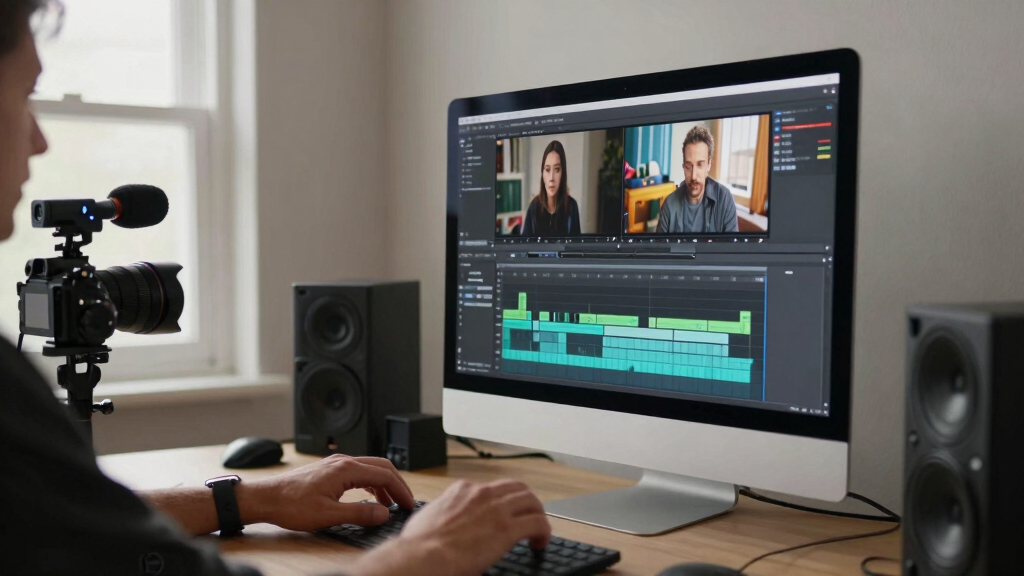
Processing a video into multiple assets might seem complex at first glance, but with a thoughtfully designed system, it becomes a logical, four-stage process that maximizes efficiency and control. For more insights on efficient workflows, see this guide. Each step builds on the previous, allowing creators to understand not just what happens, but why each stage matters and how it impacts the final output. For instance, local transcription and visual analysis aren’t just about converting speech or detecting scenes—they’re about creating a reliable foundation for accurate, context-aware assets. This means fewer errors, more tailored content, and the ability to tweak each element with full oversight. The key is understanding the importance of each phase: initial analysis informs asset generation, which in turn influences the quality of the final publishable materials. When you process a 20-minute interview, for example, the system’s ability to identify key moments, accurately transcribe speech, and detect scene changes ensures your media kit, social snippets, and ebook are not just generated automatically but are also meaningful and aligned with your content goals. This deep integration of analysis and automation reduces manual editing, speeds up production, and preserves your creative control—making the entire workflow more reliable and adaptable to your specific needs.
As an affiliate, we earn on qualifying purchases.
Why processing offline makes a difference for creators
Processing videos locally isn’t just about privacy—it fundamentally reshapes how creators manage their content’s lifecycle. Learn more about privacy-focused workflows at spiritualityread.com. When files stay on your machine, you bypass the latency, variability, and potential security risks associated with cloud processing. For more about privacy and security, see borderlinesyndrom.net. This means instant access to assets, no waiting for uploads or external server responses, and a significant reduction in exposure to data breaches or leaks. The tradeoff is that local processing requires more initial setup and computational resources—your machine must handle the analysis and generation tasks. However, this investment pays off in the form of greater control; you decide exactly when and how assets are created, edited, and stored. For small teams or individual creators, this autonomy is critical, as it prevents dependency on external platforms that might impose restrictions, introduce delays, or compromise privacy. Take a YouTuber preparing a launch: instead of uploading raw clips to a cloud platform and waiting for assets, they work entirely offline, generating a media kit, social snippets, and ebook drafts on their own terms. When ready, they can directly upload or distribute these assets, confident that their content remains secure and under their full control. This approach also offers resilience—working offline means your workflow is unaffected by internet outages or platform downtimes, ensuring your project stays on track regardless of external conditions.

privacy-focused video editing tools
As an affiliate, we earn on qualifying purchases.
As an affiliate, we earn on qualifying purchases.
From one video to every publishing channel—here’s what you get
Turning a single video into a comprehensive set of assets involves more than just format conversion; it’s about understanding the strategic value of each output and how it fits into your broader publishing plan. Discover how to optimize your content distribution at this resource. Different platforms and audiences demand tailored content—short clips for social media, detailed ebooks for deep engagement, press kits for outreach, and optimized images for branding. Recognizing this, a robust offline workflow doesn’t just generate assets blindly; it intelligently creates high-quality, platform-specific formats that align with your goals. For example, social media snippets in MP4 or vertical formats are optimized for engagement, while PDFs and high-res images serve press and branding needs. Ebooks in EPUB or MOBI formats open new distribution channels, expanding your reach. The process involves a layered understanding: each asset type requires specific formatting, resolution, and metadata considerations. Automation tools can score and suggest the best options, but understanding the implications—such as how different formats influence viewer engagement or distribution channels—empowers you to make strategic choices. This integrated approach ensures your content is not only produced efficiently but is also optimized for maximum impact across multiple platforms, all from a single source video.

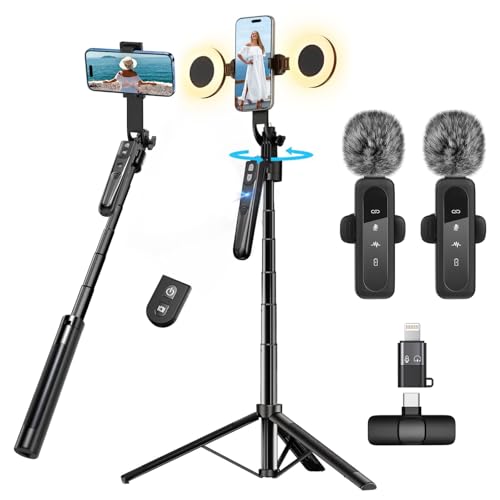
Content Creator Vlogging Kit for iPhone/Android,70-inch Auto Face Tracking Tripod for iPhone with Light and Wireless Microphones,TikTok/YouTube Starter Kit
- All-in-One Vlogging Kit: Includes tripod, microphone, and lights
- Hands-Free Recording: Seamless face tracking and gesture control
- No App Required: Intelligent face tracking with simple gestures
As an affiliate, we earn on qualifying purchases.
As an affiliate, we earn on qualifying purchases.
How a local workflow saves you time, money, and headaches
Processing everything on your own machine isn’t just about convenience; it’s about fundamentally improving your workflow’s reliability and efficiency. For recovery and muscle health tips, visit massagegunproguide.com. When you eliminate dependency on cloud services, you remove variables like upload speeds, server response times, and external API limits—factors that can slow down or disrupt your production schedule. This means your assets are generated instantly, allowing you to iterate quickly, make adjustments, and test different versions without waiting or incurring extra costs. Additionally, local processing reduces ongoing expenses associated with subscriptions or cloud storage fees. From a security perspective, keeping your data on your machine minimizes exposure to potential breaches or leaks, which is especially vital for sensitive or proprietary content. In a real-world scenario, a documentary filmmaker might need to extract clips, generate captions, and assemble a press kit on tight deadlines. Doing this locally ensures immediate access to assets, rapid revisions, and a smoother workflow—without the risk of internet outages or platform restrictions interfering with progress. Ultimately, this approach streamlines your entire production cycle, saving time, reducing costs, and providing peace of mind that your work remains private and under your control.

What to watch out for when building your offline publishing kit
While automating asset creation offline offers many advantages, it also demands careful oversight. Automated transcription and visual analysis are powerful tools, but they’re not infallible. Speech recognition can mishear words, especially with accents or background noise, leading to inaccuracies in subtitles or transcripts. Visual detection algorithms might miss subtle scene changes or misidentify objects, which could affect the relevance of clips or images. Formatting errors—such as misaligned captions, inconsistent styles, or incorrect metadata—can slip through if not checked thoroughly. These errors might seem minor but can undermine your professionalism, confuse your audience, or lead to miscommunication. Human review remains essential, particularly for final publishing, to ensure accuracy and quality. For example, an author preparing an ebook might find typos or layout issues that automation didn’t catch. If overlooked, these mistakes could harm your credibility or require costly corrections after publication. The key is to view automation as a powerful assistant—not a complete replacement for human judgment. Regularly reviewing and editing your assets ensures they meet your standards and reflect your brand’s professionalism, ultimately safeguarding your reputation and ensuring your content’s effectiveness.

How this offline system stacks up against cloud-based tools
Choosing between an offline workflow and cloud-based tools involves weighing several critical factors. Offline systems offer unparalleled privacy because all data remains on your local device, reducing risks associated with data breaches or unauthorized access. They also provide immediate processing—your assets are generated in real-time without waiting for uploads or server responses—making your workflow faster and more predictable. However, this speed and control come with tradeoffs: initial setup can be more complex, and processing may demand robust hardware capabilities. Cloud tools, on the other hand, often excel in ease of use, collaboration, and scalability. They enable quick sharing, remote access, and sometimes more advanced processing powered by distributed servers. But they also introduce ongoing costs, dependency on internet connectivity, and potential privacy concerns. For creators prioritizing security and speed, a local offline system might be more suitable, especially when dealing with sensitive content or tight deadlines. Conversely, those valuing collaboration and ease of access might prefer cloud solutions despite the tradeoffs. Understanding these distinctions helps you tailor your workflow to your specific needs, balancing control, convenience, and security to optimize your publishing process.

Who benefits most from a local, video-to-publishing workflow?
Indie creators, small publishers, and content teams who prioritize control, privacy, and rapid turnaround find this approach especially advantageous. When working with sensitive or proprietary material, avoiding cloud uploads minimizes security risks and ensures confidentiality. Moreover, a local workflow reduces reliance on internet connectivity, which is critical in remote or unstable environments, allowing continuous progress regardless of network conditions. For example, a self-published author can process their manuscript, generate promotional assets, and prepare media kits all on their personal computer, completing the entire cycle in a fraction of the time compared to cloud-dependent methods. This independence means faster iteration, immediate corrections, and total ownership of the assets—key factors for creators who want to maintain strict control over their content and brand. Additionally, those with limited budgets benefit too, as they avoid recurring subscription fees and cloud storage costs. Overall, this workflow empowers creators who need agility, security, and full ownership—making it an ideal choice for those who want to keep their work private, flexible, and under their complete control.

Your next step: building or adopting your offline publishing kit
If you’re ready to try this yourself, check out tools like ChannelHelm. It’s a comprehensive, local-first, video-to-assets pipeline designed to keep everything on your machine while automating much of the heavy lifting. Setting it up involves some initial configuration, but this upfront effort pays dividends in speed, security, and flexibility. For example, processing your first video will reveal how much faster and more private your workflow becomes, compared to uploading everything online. As you become more comfortable, you can expand your toolkit to handle additional formats, refine your automation rules, and tailor outputs to specific platforms. This approach not only enhances your productivity but also ensures your content remains under your control at every step. Remember, the future of independent publishing is in your hands—offline, fast, and fully customizable. Start small, iterate, and build a system that fits your unique needs, enabling you to publish confidently and securely on your terms.
Frequently Asked Questions
What does ‘one video in, a whole publishing kit out’ actually mean?
It means taking a single recorded video and automatically generating all the assets needed to publish—ebooks, social media snippets, media kits, and more—all from one source, with minimal manual effort.
Is this a desktop/offline tool or just a workflow idea?
It can be both. There are tools designed for local, offline processing—like ChannelHelm—that handle everything on your machine, ensuring privacy and speed without cloud dependence.
What file types does it generate?
Common outputs include MP4 videos, EPUB and MOBI ebooks, PDFs for print, high-res and low-res images for media kits, and formatted social media posts—covering most publishing needs.
Does it work for ebooks, print files, and media kits?
Yes. A comprehensive offline toolkit can produce all these assets—ready for self-publishing, printing, or press outreach—without needing online services.
How does it handle formatting quality and errors?
Automation speeds up asset creation, but human review remains crucial to catch typos, layout issues, or inaccuracies—ensuring your published material is polished and professional.
Conclusion
Switching to a local, video-to-publishing system isn’t just about avoiding the cloud; it’s about reclaiming your creative flow. You get faster turnaround, tighter control, and peace of mind knowing your work stays private. Imagine finishing a video and having everything ready—press kit, social snippets, ebook—in minutes, not hours.
That’s the future of efficient, independent publishing. Why wait? Your full toolkit is just a setup away. Make it yours, keep it local, and publish with confidence.