
TL;DR
Open a free Amazon Business account
Business pricing, bulk buying and tax-exempt orders.
Create a free accountAs an affiliate, we earn on qualifying purchases.
Moving your rig away from your workspace is the most effective way to reduce noise. Placing a machine in a closet works well if you ensure proper ventilation. Acoustic treatment is helpful but less impactful than distance and isolation.
If you’re tired of the constant hum of your AI workstation or gaming rig, you’re not alone. Many folks overlook the simplest fix: distance. Moving a noisy machine into another room or closet often cuts sound levels more than fancy foam panels ever could. Yet, many shy away from this, fearing heat buildup or complexity. This article unpacks the best ways to quiet your setup—whether through placement, acoustic treatment, or clever solutions like the ‘rig in the closet.’
You’ll learn how to make your space quieter without sacrificing performance, with real-world tips and tricks backed by recent data and expert insights. Ready to tame that noise? Let’s go.
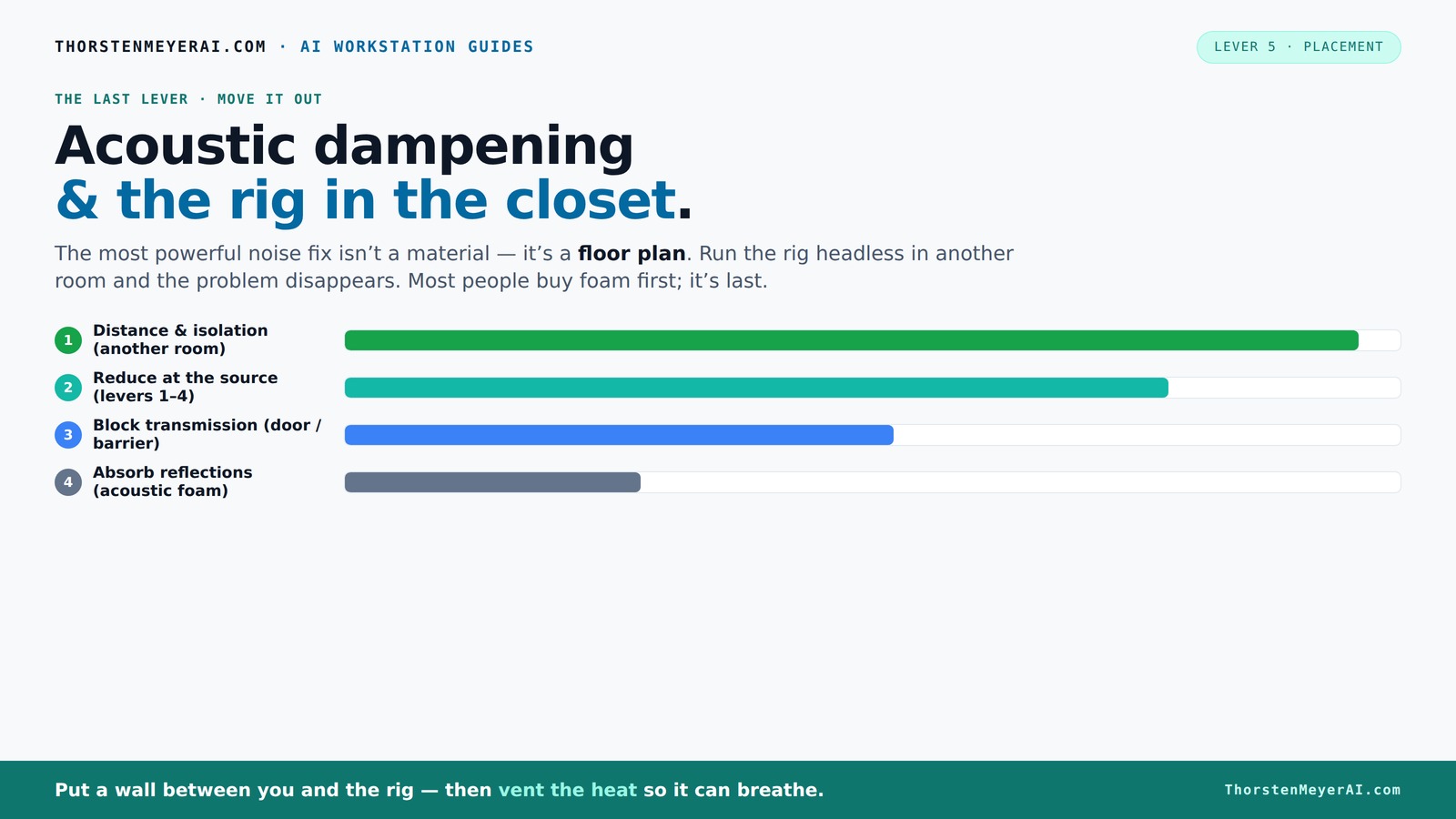
Acoustic dampening
& the rig in the closet.
The most powerful noise fix isn’t a material — it’s a floor plan. A rig you can’t hear because it’s in another room beats any amount of foam. Tap the approaches in Part 1 to see what actually works.
(another room)
(levers 1–4)
(door / barrier)
(acoustic foam)
Contain the noise, not the heat
Key Takeaways
- Moving your rig into another room or closet often beats adding foam panels for noise reduction.
- A 'rig in the closet' works well if you install active ventilation, preventing heat buildup.
- Active airflow—like exhaust fans—is essential when placing high-power components in enclosed spaces.
- Identify and treat reflection points with acoustic panels for clearer sound inside your space.
- Prioritize distance and proper ventilation before investing in expensive soundproofing materials.
soundproofing acoustic panels for computer room
As an affiliate, we earn on qualifying purchases.
As an affiliate, we earn on qualifying purchases.
Why Distance Is Your Most Powerful Noise Fix
Distance and isolation are the biggest levers for noise reduction. Think of your rig as a roaring engine—if you move it far enough away, it might as well be in another building. The sound simply doesn’t travel as far or as clearly over longer distances. This is because sound intensity diminishes with distance, following the inverse square law, which means that doubling the distance from a source reduces the sound level by about 6 dB. This reduction is significant—your rig can be loud up close but nearly inaudible from afar, drastically improving your workspace environment.
Understanding this physics highlights why physical separation is so effective: it doesn't just mask noise with barriers, it fundamentally reduces the sound energy reaching your ears. Additionally, in remote work scenarios, this approach allows you to keep your hardware in a separate room or closet, removing noise from your immediate environment altogether. The implications are that, with proper planning, you can achieve near silence at your workstation without expensive soundproofing, simply by leveraging distance and strategic placement. However, this requires considering the tradeoff of convenience versus noise control, as moving equipment may introduce logistical challenges or impact maintenance and upgrades.
quiet gaming PC case with sound dampening
As an affiliate, we earn on qualifying purchases.
As an affiliate, we earn on qualifying purchases.
How a 'Rig in the Closet' Cuts Noise — But Watch the Heat
Placing your high-power AI rig inside a closet or cabinet can significantly reduce noise, as walls and doors act as natural sound barriers. When combined with acoustic treatment like foam panels, a closet can absorb and diffuse sound waves, lowering external noise levels by 20-30 dB. Learn more about acoustic dampening. This can transform a noisy machine into a whisper-quiet presence, especially in shared or open-plan spaces. The benefit is clear: you get a quieter environment without sacrificing hardware performance. For more tips, visit Home Gym Atlas.
However, the tradeoff is heat buildup. Sealing a closet traps hot air, causing internal temperatures to rise rapidly, which can lead to thermal throttling—where the CPU or GPU automatically reduces performance to cool down—and potentially hardware failure if temperatures become critical. This makes proper ventilation not just a recommendation but a necessity. Without active airflow—such as exhaust fans, ducted vents, or even small inline fans—your hardware risks overheating, which can negate the noise benefits and damage components over time. Therefore, the key is balancing soundproofing with effective heat dissipation. Well-designed ventilation systems, like ducted exhausts or thermostatically controlled fans, allow you to keep the environment cool while maintaining a low noise profile. This balance is crucial: neglecting heat management can turn a quiet setup into a thermal disaster, so understanding the implications of enclosure design is essential.
computer noise isolation enclosure
As an affiliate, we earn on qualifying purchases.
As an affiliate, we earn on qualifying purchases.
Placement Tricks to Maximize Noise and Heat Control
Where you position your equipment can significantly influence both noise levels and thermal performance. Moving your rig into a closet, basement, or dedicated room minimizes exposure to your main workspace, reducing perceived noise. Using a ventilated cabinet or enclosure with proper airflow pathways ensures that hot air is expelled efficiently, preventing heat buildup that could throttle performance or damage hardware. Placing the machine on anti-vibration pads or rubber feet reduces structure-borne noise transmitted through the desk or floor, which can be especially noticeable with high-performance components. Identifying reflection points—such as the back wall behind your monitors or side walls facing your listening position—and treating them with acoustic panels helps tame echo and improve sound clarity. Ensuring vents and intake/exhaust openings are unobstructed is critical; blocked airflow can cause temperature spikes and noise from fans working harder. For example, a friend moved his AI server into a closet with a small exhaust fan. The noise disappeared from his office, but he had to install a temperature sensor and a fan controller to prevent overheating. These small adjustments in placement and airflow design have outsized impacts on both noise reduction and thermal stability, illustrating the importance of strategic setup choices.
As an affiliate, we earn on qualifying purchases.
The Best Materials for Acoustic Dampening Without Overheating
Acoustic foam, bass traps, and diffusers are essential for controlling internal reflections and reducing echo, especially in confined spaces like closets or small rooms. These materials absorb high-frequency sounds and diffuse mid-range frequencies, leading to clearer audio and less reverberation. However, they do not serve as sound barriers—meaning they won’t block external noise or prevent sound from escaping if the enclosure isn’t sealed. When designing a soundproofed space, combining these absorptive materials with dense mass-loaded vinyl or heavy panels enhances external noise blocking. The challenge is selecting materials that do not insulate heat excessively; overly dense or thick barriers can trap heat, risking temperature spikes. Recent innovations include eco-friendly, recycled materials that offer effective sound absorption with better breathability, aiding heat dissipation. Proper ventilation coupled with these materials creates a balance: a quiet, safe environment that prevents overheating while minimizing noise leakage. For detailed options, see this guide to low-noise PC cases and airflow.
Identifying Reflection Points and How to Treat Them
To optimize your acoustic environment, it's vital to identify the reflection points where sound waves bounce directly from your speakers or monitors to your ears—these are often the first reflections that cause echo and muddiness. Using a simple mirror held against the wall while seated at your listening position is an effective method: when you see the speakers in the mirror, you've found a reflection point. Alternatively, a laser pointer can be used to trace the path of sound waves, highlighting surfaces that need treatment. Once identified, treat these areas with acoustic panels or foam to absorb or diffuse sound. Focus on the back wall behind your monitors and the side walls facing your listening position, as these are common reflection zones. Properly treated reflection points reduce echo and improve sound clarity, which is especially important in small or enclosed spaces where sound can bounce repeatedly. For example, a home studio owner placed foam panels at the first reflection points and noticed a significant improvement in sound quality—clarity and imaging were markedly enhanced. This small investment in targeted acoustic treatment results in a more accurate and enjoyable listening experience, highlighting the importance of understanding and managing reflections.
Comparing Noise Reduction Methods — What Works Best?
| Method | Effectiveness | Cost | Best For |
|---|---|---|---|
| Distance & Isolation | Most effective | Low (room change) | Quiet workspace, remote operation |
| Active Ventilation | High (prevents overheating) | Medium | Closets and sealed enclosures |
| Acoustic Foam & Panels | Moderate (reduces echo) | Low to Medium | Room acoustics, small spaces |
| Soundproof Barriers | High (blocks sound) | High | Shared spaces, apartments |
Conclusion
Don’t underestimate the power of distance. Placing your noisy rig in a different room or closet often makes the biggest difference. Just remember: good ventilation isn’t optional—it’s the key to keeping your hardware cool and healthy.
With thoughtful placement and simple tweaks, you can enjoy a quiet workspace without sacrificing performance. Your next step? Pick a spot, set up proper airflow, and let the noise fade away. Your ears—and your hardware—will thank you.
Evergreen bestsellers Picks
bestsellers
As an affiliate, we earn on qualifying purchases.